Antla is a Shopify app that lets shoppers upload a photo and see themselves wearing your products. You set up Funnels, turn on a storefront, and Antla generates the look. Email, share, and discount follow-ups are optional.
Shoppers who see a product on themselves buy with more confidence. Try On sits on the product page so visitors can check fit and style before they add to cart.
Typical outcomes:
A clear Try On call to action on eligible products
Fewer “will this look good on me?” drop-offs
Shareable results that travel beyond the store
Optional email capture and discounts tied to the try-on
You configure Funnels in the Antla admin. Each Funnel sets the look style, the generation model, and which products are eligible. Products in a Funnel are tagged antla_in_funnel_<id> so the storefront knows when to show Try On.
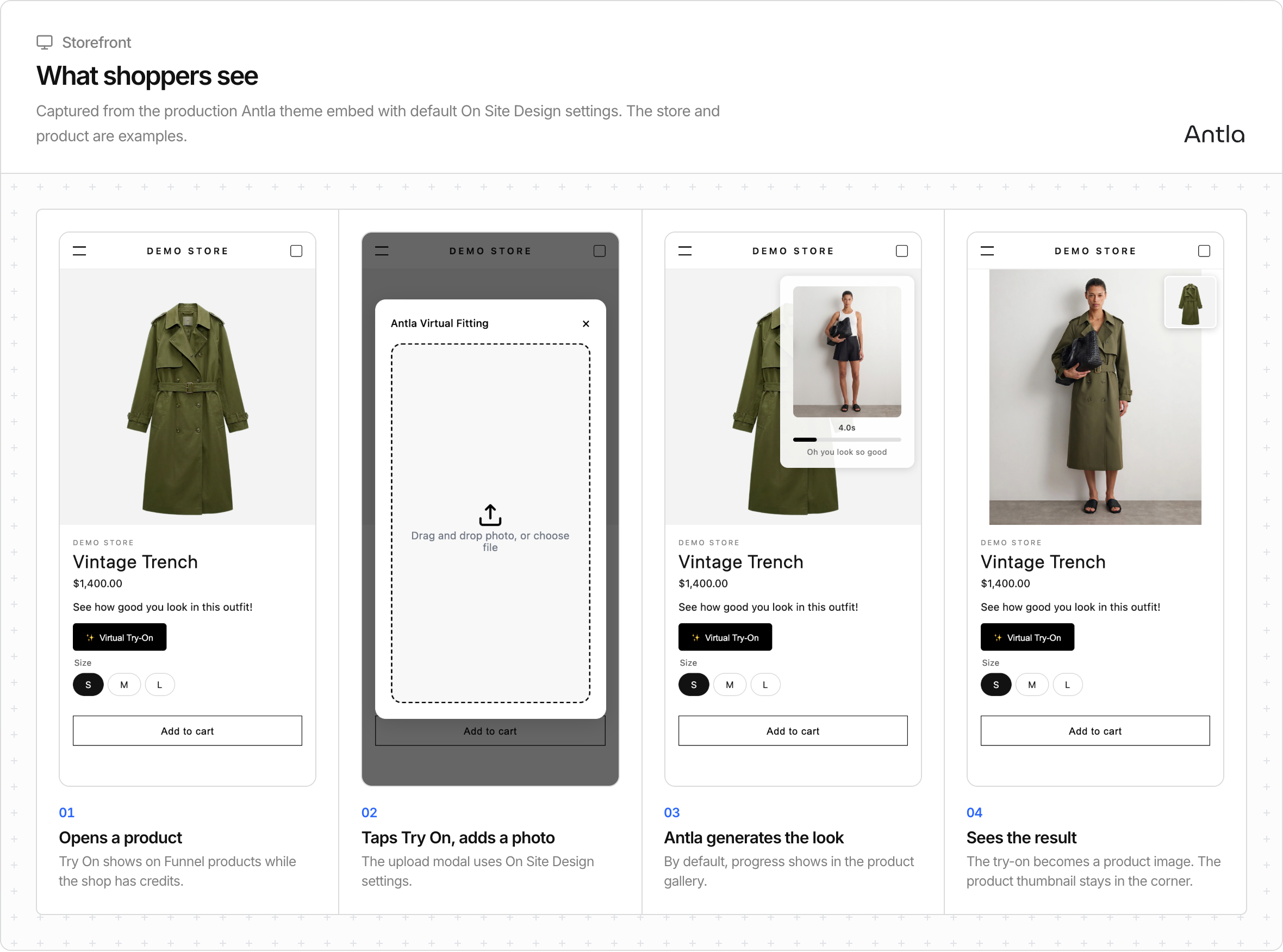
A shopper opens an eligible product, taps Try On, uploads a photo, waits for the result, then continues shopping. Email, share, and discount steps run only if you turned them on.
Surface | Who it is for |
|---|---|
Online Store theme embed | Most merchants |
Tapcart custom block | Tapcart mobile apps |
Headless SDK | Custom Shopify storefronts that want Antla’s UI |
Headless API | Apps that call Antla with HTTP and own the UI |
Funnels and credits are shared. Pick the surface in Choose where Try On appears.
Term | What it means |
|---|---|
Funnel | Look style, generation model, and product list |
Try On | The shopper button and flow |
Credits | Units used when a look is generated |
On Site Design | Theme and SDK look and copy, edited in Antla |
Try-On Feed | Completed shopper looks inside the app |
Antla Pro / Fast / Light | Generation models that trade quality and speed |
Headless key | Shared credential for Headless SDK and Headless API |
They open a product that belongs to an active Funnel.
They see Try On when that surface is enabled and the shop has credits.
They upload a photo. Antla generates a look with the Funnel’s model.
They review the result and can share, leave an email, or take a discount if you enabled those steps.
Shopper walkthrough: How shoppers try products on. Photo guidance: Photo tips for best results.
Install Antla and finish onboarding. Install Antla & complete onboarding
Create a Funnel and add products. Create your first Funnel
Enable the matching storefront. Theme embed, Tapcart, Headless SDK, or Headless API.
Tune On Site Design if you use the theme or the SDK. Customize On Site Design
Confirm billing and credits before traffic.
You do not edit theme Liquid for day-to-day design on the Online Store. On Site Design holds that.