Antla does not always send try-on emails the second a shopper submits their address. Timing is controlled in App Settings so you can match your brand’s follow-up style.
Shopper finishes a try-on and submits email (and optional friends).
Antla creates ANTLA- discount codes right away.
Emails go out through Antla’s email delivery (SendGrid) according to your Email Timer and Repeat settings.
Delivery can take a little time even when set to Instant—plan for a short delay, not a guaranteed “same second” inbox arrival.
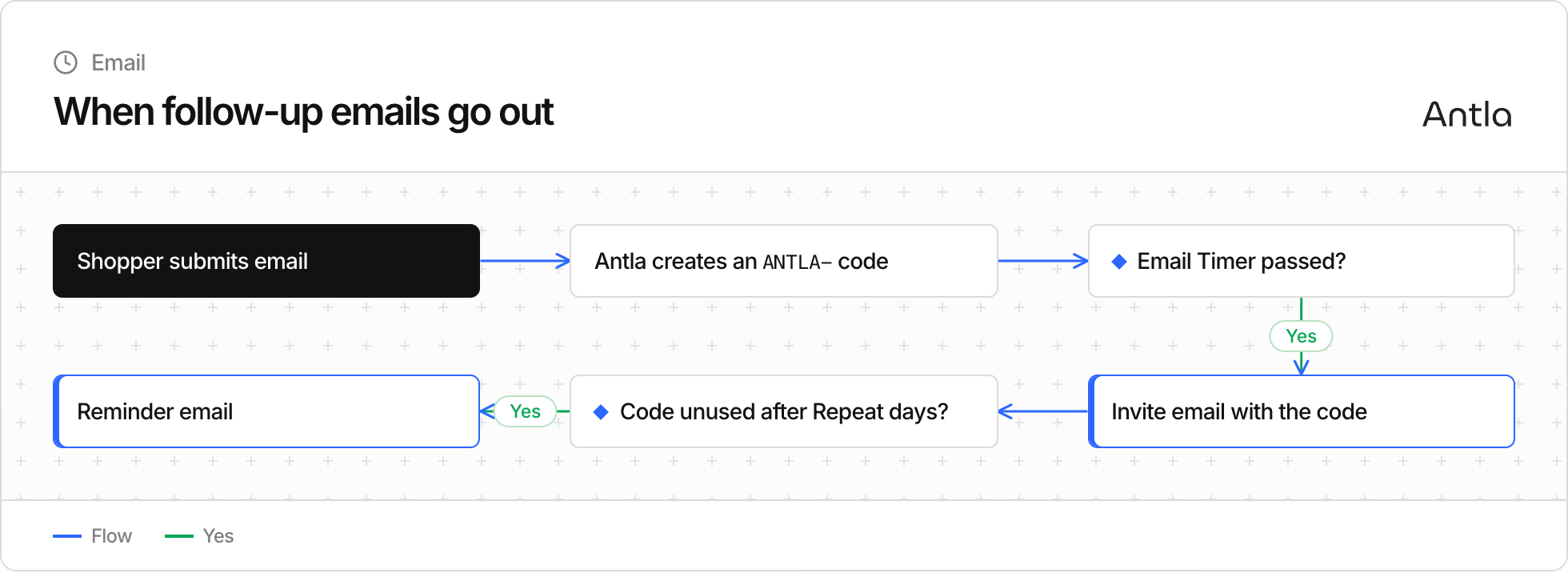
In App Settings, Email Timer (Hours) controls how long Antla waits after the discount is created before sending the first invite-style follow-up.
Typical options include:
Instant (Default) — send as soon as Antla’s sending process is ready
1, 3, 6, 12, or 24 hours — wait that many hours before the first email
Use Instant when the try-on image in the inbox is the main conversion lever. Use a delay when you want a softer touch (for example, after the shopper has browsed without buying).
Repeat Email if discount not used after (days) sends a reminder when:
The first email already went out, and
The ANTLA- code is still unused, and
The number of days you set has passed
Default-style setups often remind after about 1 day, but you can choose up to several weeks. Reminder emails reuse your email design and include the look plus the same code.
If the shopper already redeemed the code, Antla does not keep nudging them with that unused-code reminder path.
Depending on your setup and share method, a shopper journey can include:
An immediate “here’s your look” style message when sharing by email is used
A timed invite email with the discount (Email Timer)
A later reminder if the code sits unused (Repeat days)
Friend messages styled with friend email design when invites are used
Design subjects, headers, logos, and buttons under email design / friend email design. Timing lives in App Settings.
Before assuming something is broken:
Confirm Email Timer — they may still be inside the wait window.
Wait a few minutes even on Instant (sending is batched, not always live).
Ask them to check spam, promotions, and filters for Antla / your brand name.
Confirm they submitted a valid email on the try-on flow.
Confirm email collection / design is enabled and discounts are configured.
For broader checkout or storefront issues, see Troubleshooting common issues.
Fashion / impulse — Instant or 1 hour keeps the look fresh.
Higher AOV — 6–24 hours can feel less pushy and still recover abandoners.
Reminders — 1–3 days is usually enough; longer gaps rarely improve redemption.
Always test with your own email before changing live campaigns.