Antla Klaviyo flows send personalized try-on emails after a shopper finishes a look. You choose whether to show their original try-on or recommend new products on the same photo, set who qualifies, optionally add a discount, and track checkouts with antla_flow_id.
Connect Klaviyo in Antla — see Connect Klaviyo.
Have at least one Funnel with products live on the storefront.
Confirm shoppers can complete a try-on and (if needed) provide an email.
Flows are built in the Antla admin under Klaviyo, then published as Live, Paused, or Draft.
When you create a flow, pick what the email should do:
Type | What the shopper gets |
|---|---|
Show them their try-on | The exact look they just generated |
Recommend a new look | One new outfit generated on the same base photo |
Recommend a set of looks | Several recommended products on the same base photo |
Recommendation flows can pull products from the same collection, a similar price range, recently added items, or (for a single recommendation) a specific product you choose.
Control which try-ons can trigger the flow:
A specific product — one product
Multiple products — hand-picked list
Collections — one or more collections (match any or all)
Products with a tag — match by product tag (any or all tags)
All products — every product in your store
Only try-ons that match the audience rules enter the flow.
Work through the flow steps in order:
Trigger — when a qualifying try-on completes (and marketing consent rules apply where relevant)
Audience — products, collections, or tags as above
Send email — show try-on or recommend; edit template variables for images, product links, and copy
Timing — send immediately, or delay by minutes, hours, or days
Email list — choose an existing Klaviyo list or create one
You can optionally attach a discount (percentage and code prefix). When enabled, Antla includes the code in the email so shoppers can return with an incentive.
antla_flow_idLinks in flow emails include antla_flow_id so Antla can attribute later activity to that flow.
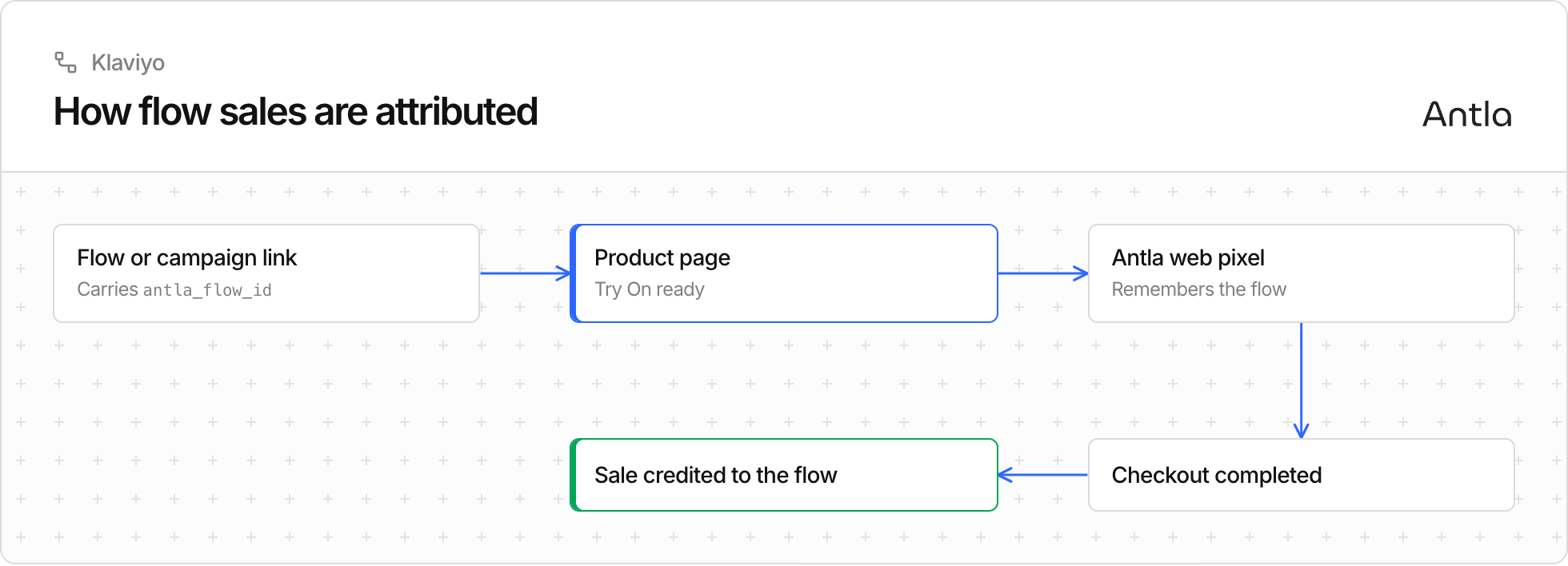
The Antla web pixel reads antla_flow_id from the page URL (or hash) when the shopper lands.
At checkout completed, Antla associates the conversion with that flow.
You do not need to add pixel code by hand; keep the Antla app and its web pixel enabled so attribution stays intact.
Save the flow as Draft while you test templates and audience.
Use Antla’s test options where available before setting the flow Live.
Pause anytime to stop new sends without deleting the flow.
Watch try-ons sent, conversions, and revenue for each flow in the Klaviyo section of Antla.
If emails are not sending as expected, see Troubleshooting common issues and Connect Klaviyo.