Headless API is Antla’s HTTP integration. You build the Try On screens. Antla provides upload, generation, and result endpoints. Connecting it does not require Shopify Storefront tokens.
Use this when you own the UI: a custom storefront, a partner app, or a native app. If you want Antla’s ready-made button and modal on a headless Shopify page, use Headless SDK instead.
A Headless key and an API base URL for that store. Every request sends the key in the X-Antla-SDK-Key header. The key looks like antla_sdk_…. That prefix is the credential format. It is not proof that you connected the SDK.
Products, Funnels, and credits are the same ones you already set up in Antla. Your app must send a product that is in a Funnel, with a real variant and a public shopper photo URL.
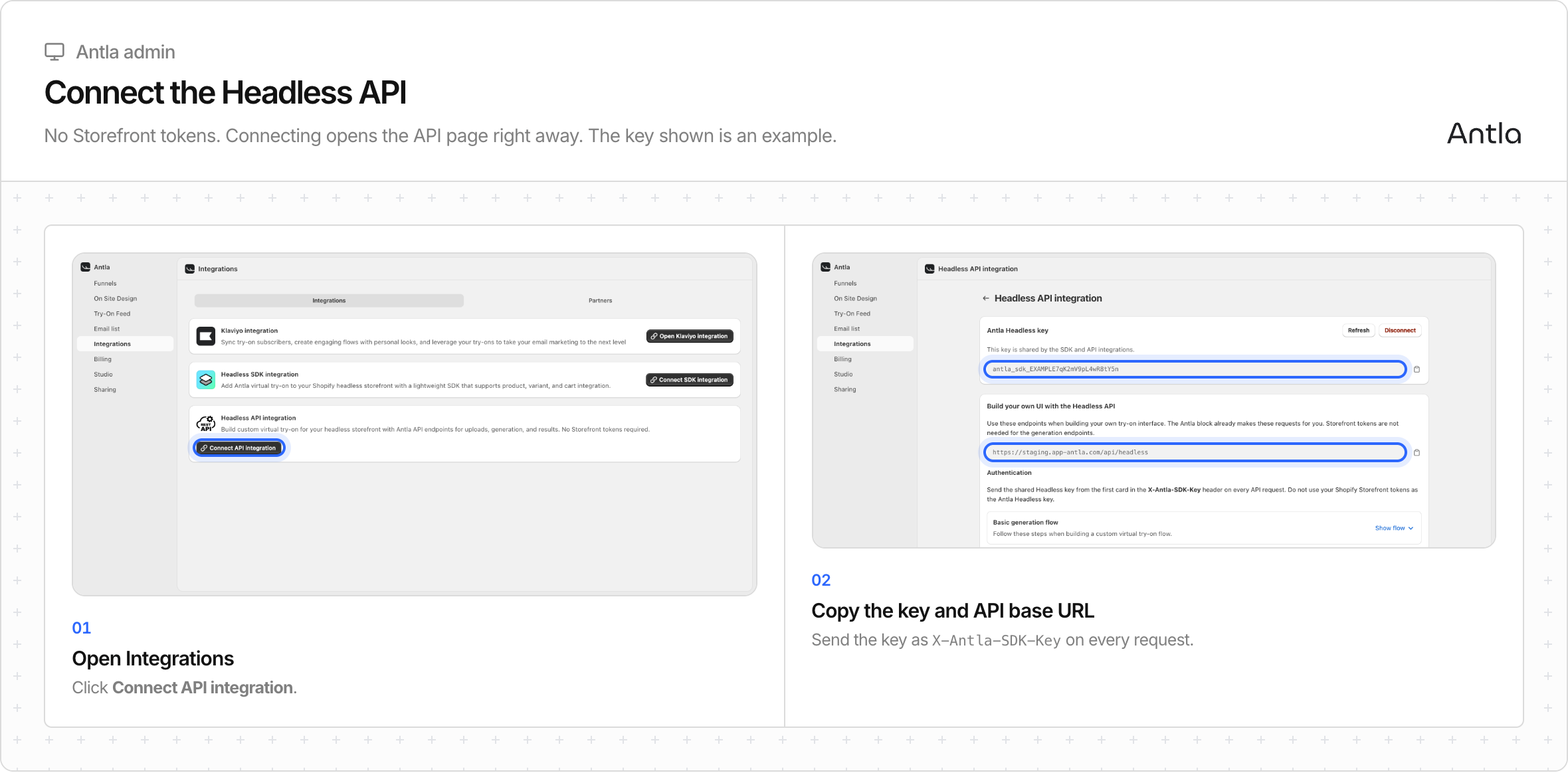
Open Antla → Integrations.
On Headless API integration, click Connect API integration.
Antla opens Headless API integration.
Copy Antla Headless key.
Copy API base URL. It ends in /api/headless.
If the SDK is already connected, the API card already says Open API integration. The SDK key and the Headless key are the same value. Opening the API page is enough. You do not need a second connect.
A failed connect shows the error from the server, such as Could not connect API.
Send JSON to {API base URL} with:
X-Antla-SDK-Key: YOUR_HEADLESS_KEY
Content-Type: application/json
Do not send Shopify Storefront tokens as the Antla key. Do not use Authorization: Bearer.
A working custom flow is:
Read the product from your own catalog. Parse tags named antla_in_funnel_<id>.
Optionally call GET /funnel?funnelIds= to confirm those IDs belong to this store.
POST /uploads, then PUT the photo bytes to the returned upload URL. Or pass a public photo URL you already host.
POST /generations once. Save jobId.
GET /generations/{jobId} about every two seconds until the image is ready or the job has an error.
Cart is not an Antla endpoint. Add the variant with the Shopify Storefront Cart API if the shopper is buying on Shopify.
GET /context returns the Storefront API URL and public token. It requires the Headless SDK connection and its Storefront tokens. An API-only shop gets HTTP 403 with code SDK_NOT_CONFIGURED.
API-only apps already have product IDs from their catalog. They do not need /context to generate a look.
Refresh replaces the key immediately for the API and the SDK. Update every client that stores it.
Disconnect on the API page is available only when the SDK is off. If the SDK is connected, the API page tells you to disconnect the SDK first. API-only disconnect stops that key immediately.
There is no public npm package, native iOS or Android SDK, partner-wide key, completion webhook, job list, or cancel-generation endpoint. Theme antla_* events do not apply. Your app owns retries, polling, and shopper identity.
Developers should use the Antla developer docs for request bodies, error codes, and examples.