Use this guide when Try On is missing, generation fails, emails are late, or Klaviyo is not behaving. Start at the top of the tree and work down—most issues are credits, Funnel membership, or embed / connection settings.
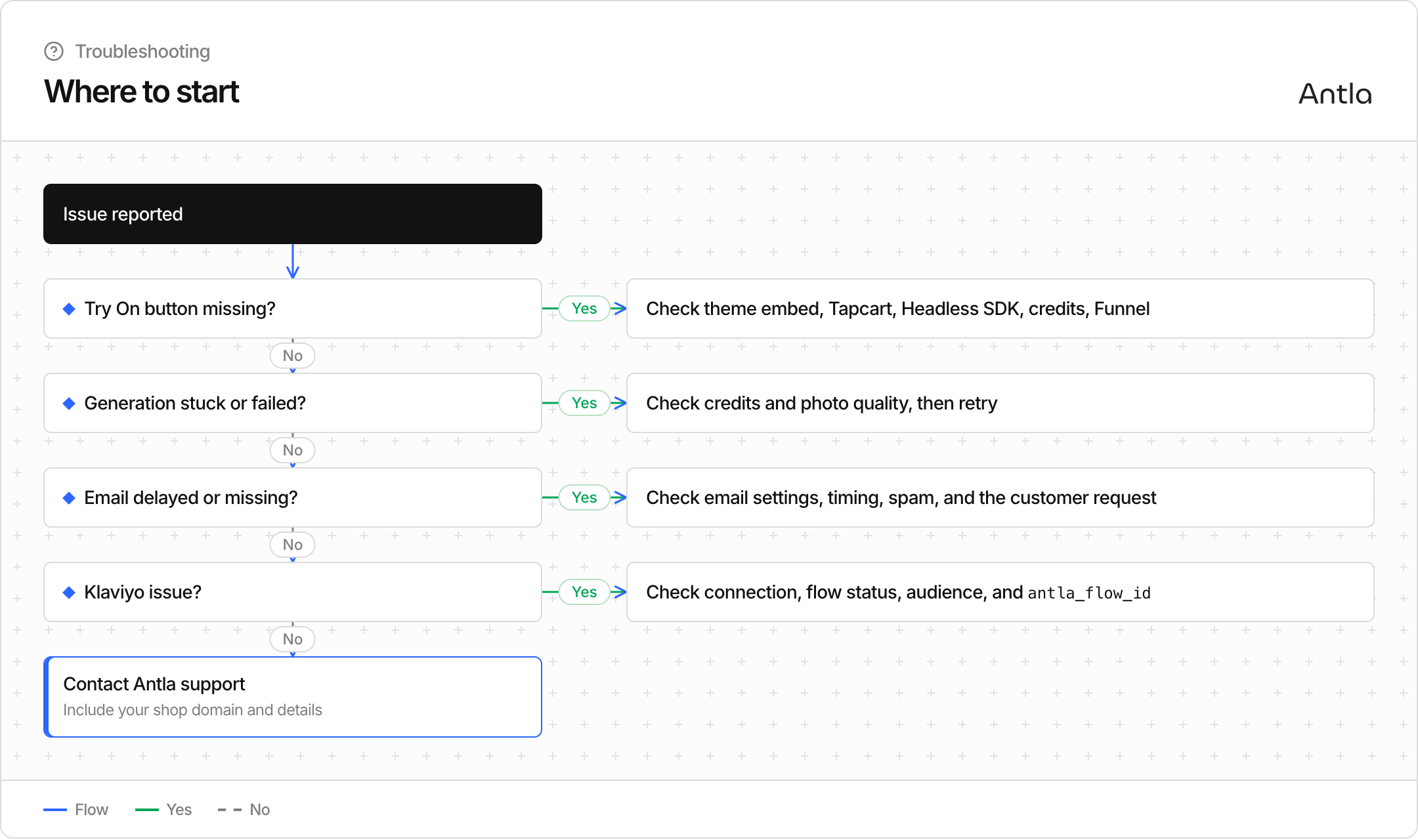
Work through these in order:
App embed (online store) — In the Shopify theme editor, confirm the Antla app embed is enabled and the theme is saved. See Enable the Try On button (theme embed) and Why the Try On button disappeared.
Tapcart (mobile app) — Confirm the Antla custom block is on the product screen and published. See Tapcart setup.
Credits — If trial, monthly, and purchased credits are all at zero, Antla hides Try On. Check Dashboard / Billing and How try-on credits work.
Funnel membership — The product must belong to an active Funnel. Re-check product selection or automated rules in Add products: manual vs automated rules.
Design / visibility — In On Site Design, confirm the button is not disabled for that context and that colors still contrast on your theme.
Headless SDK — Confirm the script URL and key from Headless SDK integration, the product ID, and that the product is visible to the connected Storefront. See Connect Headless SDK.
Headless API — There is no Antla button. If shoppers see nothing, the custom app is not rendering Try On. Confirm the Headless key and that GET /context was not required for an API-only shop. See Connect Headless API.
Still missing after these checks? Note the product URL, which surface you use (theme, Tapcart, SDK, or API), and credit balance when you contact support.
Credits mid-session — Confirm credits remain when the shopper taps generate.
Photo — Ask for a clear, well-lit, full-body or upper-body shot without heavy filters. Share Photo tips for best results.
Retry — Have the shopper close the modal, reopen Try On, and try again with a different photo.
Model choice — If one generation model consistently fails for a product type, try another (Pro / Fast / Light) on the Funnel—see Choose a generation model (Pro / Fast / Light).
Studio vs storefront — If Studio works but the storefront does not (or the reverse), say so when escalating; paths differ slightly.
Persistent failures: capture approximate time, product, and whether Studio works for the same garment.
Collection enabled — Email capture must be on in On Site Design / email settings.
Timing — Antla can delay send based on your email timer. See When customers receive emails.
Spam / promotions — Ask the shopper to check spam and promotions folders.
Customer request — Confirm they completed the email step after the try-on (a Customer request / invite is created when they submit).
Discount emails — If the message includes a code, verify discount settings are active—Discount settings & friend invites.
Connection — Re-open Klaviyo in Antla and confirm the account is still connected (Connect Klaviyo).
Flow status — Draft and Paused flows do not send. Set the flow Live.
Audience — The try-on product must match the flow’s products, collections, or tags (Klaviyo flows (show try-on / recommend)).
Consent — Recommendation / more-looks style sends may require marketing / more-looks consent. See Privacy, photos & data retention.
Credits for recommendations — Recommend flows generate new looks and use credits; low balance can block sends.
Attribution — Checkout attribution needs antla_flow_id on the landing URL and the Antla web pixel enabled. Snippets and campaign links are covered in Klaviyo snippets & campaign links.
Include:
Shop domain
Online Store, Tapcart, Headless SDK, or Headless API
Product URL or handle
Approximate time of the issue
Whether the problem is button, generation, email, or Klaviyo
Screenshots if the UI shows an error