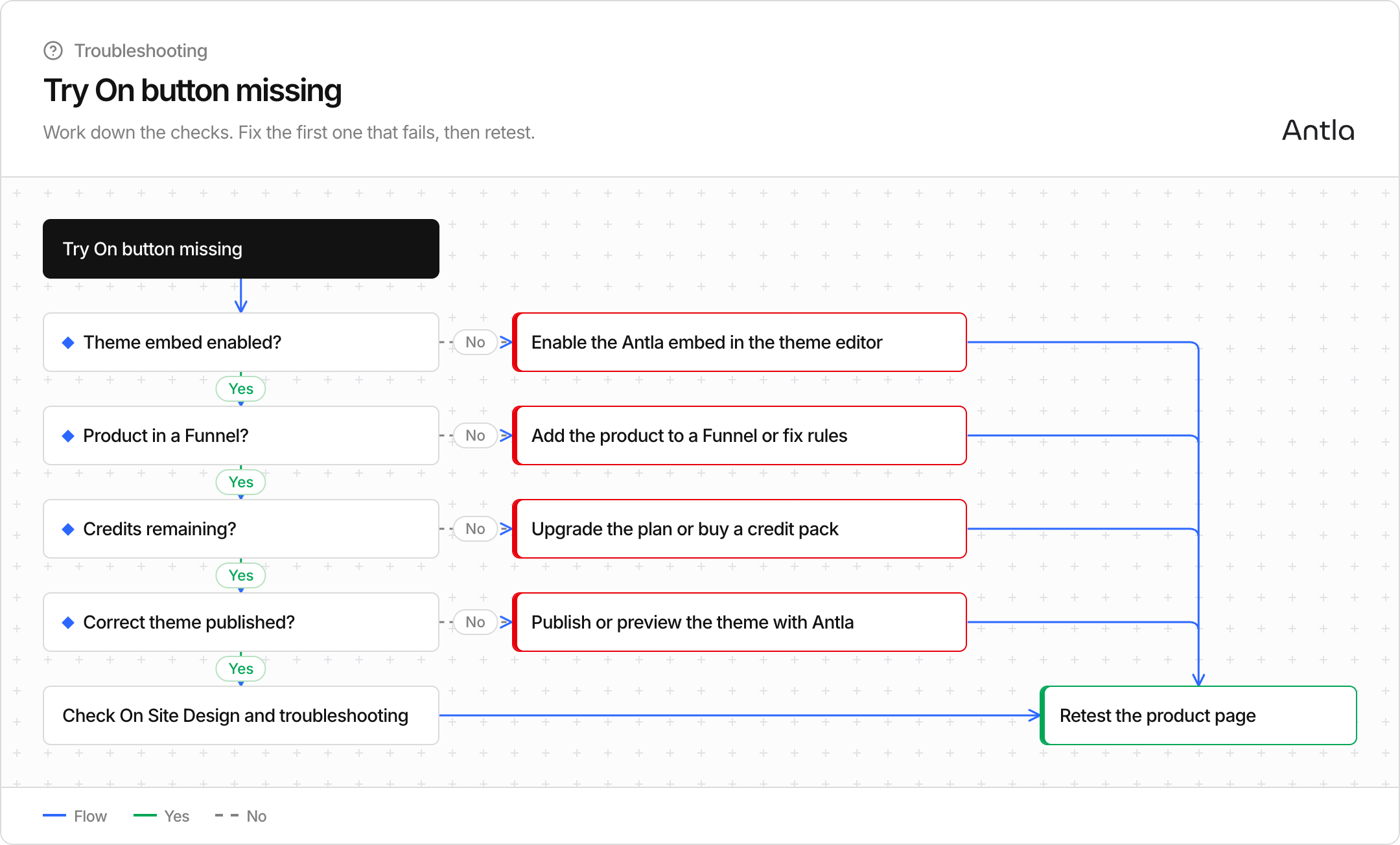
If shoppers do not see Try On on an Online Store product page, it is almost always embed, Funnel membership, credits, or the wrong theme. Work through this checklist in order.
This article is for the theme app embed. Tapcart, Headless SDK, and Headless API do not use that embed. See Choose where Try On appears.
Is the Antla theme embed enabled on the theme you’re viewing?
Is the product in an Antla funnel (tagged / linked for try-on)?
Do you have credits remaining?
Are you looking at the correct published theme (and the right market / preview)?
Antla’s storefront button comes from the theme app embed. In Shopify:
Go to Online Store → Themes → Customize.
Open App embeds (theme settings).
Turn Antla (Try On) on.
Save.
If the embed is off, no product will show the button—even if funnels and credits are perfect. See Enable the Try On button (theme embed).
Only products linked to an active funnel show Try On. That may be:
Manual product selection in the funnel, or
Automated rules that match tags, collections, vendors, etc.
If you recently removed a product from a funnel or changed rules, the button can disappear on that PDP while remaining on others. Confirm the product still appears under the funnel’s products list. See Add products: manual vs automated rules.
When trial + monthly + purchased credits reach zero, Antla hides the Try On button storewide so shoppers can’t start a try-on that won’t generate.
Check the Antla dashboard / Billing for remaining credits. Restore capacity with a plan upgrade or credit pack. Details on spend order: How try-on credits work.
Common gotchas:
Embed enabled on a draft theme, but the live theme is different
Previewing a theme that doesn’t have Antla turned on
Mobile vs desktop theme customizations (confirm both if you use separate setups)
Always test on the published theme URL your customers use.
Confirm On Site Design hasn’t hidden or restyled the button into something easy to miss (Customize On Site Design).
Hard-refresh the product page; try an incognito window.
Confirm you’re not on a password page or a market/language URL that uses another theme.
Headless SDK: confirm the script URL, key, product ID, and that the product is visible to the connected Storefront. Connect Headless SDK
Headless API: there is no Antla button. Your app must render it. Connect Headless API
See Troubleshooting common issues and share your shop domain plus the product URL with support if needed.